IndiaMart CRM

Our IndiaMART CRM is built to simplify lead management by automatically fetching and centralizing your IndiaMART enquiries — completely API-free. Once connected, the system continuously monitors your IndiaMART seller account to collect leads, customer messages, and contact details into one streamlined dashboard. Designed for businesses that depend on IndiaMART for B2B growth, this CRM keeps all your buyer interactions organized and actionable.

Try For Free
IndiaMart CRM  Result
30+
Scraping Tools
10+
CRM Tools
10M+
Emails
15M+
Contact Number

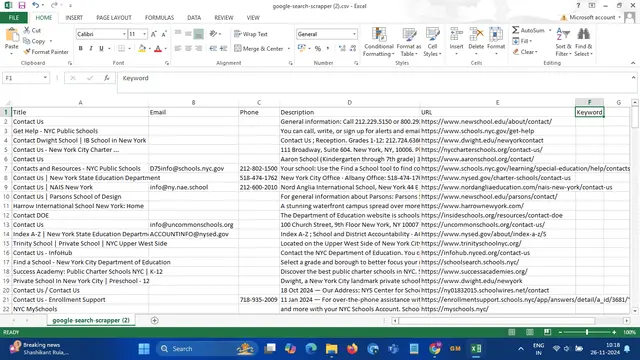
What Type of Data You Can Get

Enquiry Date
Customer Name
Phone Number
Enquiry Source
Location
Last Seen

How It Works

Introduction

Our IndiaMART Enquiry Scraper is designed to simplify your lead collection process by automatically fetching customer enquiries from your IndiaMART seller account — no API required.

Try Now
IndiaMart CRM
Welcome to Scrape Genius IndiaMART CRM
IndiaMart CRM Lead Management

Our IndiaMART Enquiry Scraper is designed to simplify your lead collection process by automatically fetching customer enquiries from your IndiaMART seller account — no API required.

Set Date Range

Begin by selecting the current month’s date in the tool. This defines the time range for collecting leads from your IndiaMART account.

Try Now
IndiaMart CRM
Step 1: Select the Current Month Date
IndiaMart CRM Lead Management

Begin by selecting the current month’s date in the tool. This defines the time range for collecting leads from your IndiaMART account.

Login and Authenticate

Next, click the 'Fetch Leads' button. A new browser window will open automatically and redirect you to IndiaMART’s login page. Simply log in and enter your OTP to continue.

Try Now
IndiaMart CRM
Step 2: Click on Fetch Leads
IndiaMart CRM Lead Management

Next, click the 'Fetch Leads' button. A new browser window will open automatically and redirect you to IndiaMART’s login page. Simply log in and enter your OTP to continue.

Fetch Enquiries

Once logged in and your dashboard opens, return to the tool and click 'Fetch Leads' again. The scraper will begin collecting your enquiries in real time.

Try Now
IndiaMart CRM
Step 3: Start Lead Extraction
IndiaMart CRM Lead Management

Once logged in and your dashboard opens, return to the tool and click 'Fetch Leads' again. The scraper will begin collecting your enquiries in real time.

View Collected Leads

Within a few minutes, leads will start appearing in your panel. Review and manage them easily from the dashboard — all your IndiaMART enquiries in one place.

Try Now
IndiaMart CRM
Step 4: View and Manage Your Leads
IndiaMart CRM Lead Management

Within a few minutes, leads will start appearing in your panel. Review and manage them easily from the dashboard — all your IndiaMART enquiries in one place.

Retrieve Old Leads

You can also select an older date to fetch past leads. Simply change the date and click 'Fetch Leads' again — the tool will collect and append older leads to your list.

Try Now
IndiaMart CRM
Step 5: Retrieve Older Leads
IndiaMart CRM Lead Management

You can also select an older date to fetch past leads. Simply change the date and click 'Fetch Leads' again — the tool will collect and append older leads to your list.

IndiaMart CRM
Step 6: Follow Up with Customers
IndiaMart CRM Lead Management

After fetching your leads, you can directly connect with your customers through calls, WhatsApp, or messages — all from your central CRM dashboard.

Engage with Customers

After fetching your leads, you can directly connect with your customers through calls, WhatsApp, or messages — all from your central CRM dashboard.

Try Now

Watch a Demo

Frequently Asked Questions

A Data Extractor is a versatile tool that extracts data according to given keywords. It supports a range of data scraping tools for various needs, including website data scraper, yellow pages scraper, whois database lookup, and image scraping. The Data Extractor can gather data such as mobile numbers, website URLs, and email IDs, which are essential for business growth. This tool can be used for business directory scraping, whois domain searches, and scrape images from websites, making it a powerful asset for web scraping service. With options like web scraper Chrome extension, yellow pages scraper free, and online web scraper capabilities, this tool makes scraping tasks easier. Compatible with scraping software like business directory scraper and web scraping, it is designed for efficient data extraction. The Data Extractor can help with domain search whois, scrape data from website to Excel, and even scrape LinkedIn and scrape Instagram photos. As a comprehensive web scraping tool, it ensures accurate and organized data, providing businesses with valuable insights. From whois database download to screen scraping tools, the Data Extractor meets diverse data needs for professionals and organizations.

Yes, the Data Extractor has many tools and can scrape data in various ways, making it highly versatile. This includes tools like the Google Search Scraper, Google Map Scraper, Website Data Scraper, Whois Domain Data Scraper, Business Directory Scraper, and Document Data Scraper. Additionally, it offers specialized features such as the yellow pages scraper for yellow pages data extraction, whois database download for whois domain information, and image scraper from website for gathering visual data. Whether you're looking to perform business directory scraping, web scraping yellow pages, scrape excel, csv and more files, or scrape Instagram photos, the Data Extractor provides the tools you need. It’s compatible with advanced options like business directory scraper and web scraper, as well as free tools such as yellow pages scraper free and online web scraper solutions. This makes it ideal for a variety of scraping tasks, from scraping LinkedIn to conducting icann whois searches, and supports data scraping tools for efficient data collection.

A Google Search Scraper is a specific type of web scraping tool that is designed to extract information from the search results pages of Google. This tool simulates a user querying Google's search engine and then collects data from the search results displayed, including website URLs, titles, descriptions, and keywords. As part of a larger suite of data scraping tools, the Google Search Scraper enables users to perform targeted whois searches for domain information and to gather insights for business directory scraping. It is particularly useful for digital marketing professionals and SEO experts looking to analyze competition, track trends, or gather leads. This tool is often integrated with other scraping functionalities, such as yellow pages scraper for business listings or whois database lookup for domain registration details. With the ability to automate the extraction process, users can save time and effort while obtaining accurate data to drive their strategies.

A Business Directory Scraper is a tool designed to extract information from online directories like Yelp, Yellow Pages, LinkedIn, and industry-specific databases. It gathers data such as company details, services, email IDs, contact numbers, and domain names, and can perform Whois searches for enhanced data accuracy. This tool helps streamline lead generation and manage customer data efficiently by extracting valuable insights from various business directories.

A Document Data Scraper is a tool designed to extract contact numbers and email addresses from various document formats such as CSV, TXT, DOC, DOCX, XLS, HTML, and JSON. It streamlines data extraction for communication tasks, ensuring high accuracy and efficiency, particularly in business directory scraping and web scraping. The tool automates the extraction process, saving time and reducing manual effort, making it ideal for lead generation, Whois domain data, and large dataset analysis.

Our Website Data Scraper tool lets you easily scrape data from millions of websites worldwide. With this powerful web scraping service, you can extract domain names, email IDs, phone numbers, titles, and country details in a snap. It's simple to use, making it perfect for quick research and finding contacts. Whether you're conducting a whois database lookup or gathering leads, our website scraper is designed to boost your business by gathering all the info you need effortlessly. Utilize our web scraping tools to streamline your data collection process and enhance your marketing strategies.

Why 30,000+ Customers Choose Us

Advanced Scraping Technology

Effortlessly scrape data from Google Maps, websites, and directories with precision.

Secure & Reliable

We ensure top-tier data privacy and protection for all your scraping projects.

24/7 Customer Support

Our global team is always ready to assist you with any query or concern.

Built-in Proxy Integration

Avoid IP blocks and CAPTCHAs with built-in advanced anti-scraping technology.

Easy-to-Use Interface

Start scraping instantly with a simple and intuitive user interface.

Cloud-Based Platform

Access your tools and scraped data anywhere, anytime, with seamless cloud support.

Phone Number WhatsApp
UPI